Service and Support through PeopleLink Partners and Resellers in your region
Published Specifications
PDF Datasheets available for PeopleLink products
Overview
What a 20x Document Camera does in a Classroom
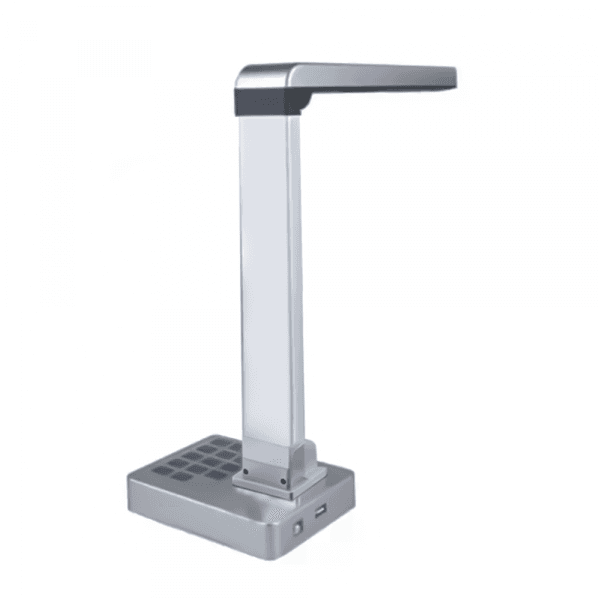
The PeopleLink iVision Pro-20X is a Document Camera for Classrooms, Training Rooms and Document Presentation. An 8 Megapixel 1/3.2 inch CMOS sensor captures an A4 area at 3264x2448, with 20X Zoom made up of 5x mechanical and 4x digital. A three-stage LED light, Auto Focus, Image Freeze, Mirror, Rotate and multi-language OCR handle the page, and a built-in microphone records voice with the video. Two USB 2.0 ports, HDMI Out and VGA Out send the picture to a room display and to common video conferencing platforms on Windows, Mac or Android. A foldable 1.2kg body means one unit moves between rooms rather than staying in one.
Extraordinary Digital Presentation from the PeopleLink iVision Pro-20X, with true images in virtually any condition. A large, highly efficient Imaging Sensor and strong Document Capture deliver high quality images, and large, intuitive buttons keep navigation and control simple. Mirror, Rotate, Split Screen, Black and White, Positive and Negative, Image Freeze and Title Grab let you work with objects or text live on screen without affecting the original source. The iVision Pro is light and portable, with a foldable design that stores easily when it is not in use.
20X Zoom (5x optical, 4x digital)
Three-stage LED light (Five-stage optional)
Video Freeze, Negative, Rotate, Auto focus, Text
With microphone, synchronous voice record
Could Integrate the Vice Camera for Interactive Teaching, Training, Visual Presentation
Key Specifications
Headline specifications from the product Datasheet. Full model-by-model detail is in the PDF.
Item
PeopleLink iVision Pro 20X
Zoom
20X
Main camera
8 MP
1/3.2" CMOS sensor
1/3.2"
Scan speed
1 Second
Technical Specifications
Camera Spec
Image Sensor
1/3.2" CMOS
Main Camera
8 Mega Pixels ( 3264x2448 )
Frame Rate
15 mfps @3264*2448; 30 mfps @1080P
Zoom
20X (5Xmechancal zoon, 4x digital)
Specifications
Ports
USB2.0 x2
HDMI OUT
1
VGA OUT
1
VGA IN
1
Scan speed
1 Second
Video Freeze
Yes
Effective Area
A4
Shutter Speed
1 Second
Freeze
Yes
Zooming
Mouse Wheel Zooming
Others
Software Functions
Document camera, Whiteboard Mark, PDF Transfering
Power
DC 5V
W xD xH
Set up: 265*150*445MM, Folded: 150*75*445mm
Net Weight
1.2KG
Carton Size
500*960*180MM
Software
Image Viewing
Color/BW, Mirror, 90 Degrees Rotation up to 270 Degrees, Negative (Optional)
Share Documents, Textbooks and Objects in detail on the room display.
Training rooms
20X Zoom and an 8 Megapixel sensor keep fine print and demonstrations clear.
Document presentation
Capture, Freeze and Mark live without altering the original source.
Where a Document Camera Fits in Your Organisation
How organisations deploy a Document Camera, and what changes for the teams that use it
Education
Classroom Demonstrations for a School Group
A school group in the Middle East uses the PeopleLink iVision Pro 20X in Classrooms to put a textbook page, a worksheet or a small object on the room display. 20X Zoom, built from 5x mechanical and 4x digital, brings fine print up to a readable size, and the three-stage LED light evens out the page under classroom lighting. Image Freeze holds a page on screen while the teacher writes beside it, and the foldable design lets one unit move between rooms.
Government
Records Digitisation at a Government Office
A government office captures forms and file pages at the counter instead of sending them to a copy room. An iVision Pro 20X stands over an A4 area and takes a page in a single action, and multi-language OCR turns that capture into searchable text. Single and multi-page scanning builds a PDF from a whole file in one sitting, and USB power means the desk needs no extra socket. It runs on the Windows, Mac and Android machines already in service.
Enterprise
Service Training for an Instrumentation Company
An instrumentation company trains service engineers by placing a small assembly under an iVision Pro 20X and sharing the view on the room display and in the remote session. HDMI Out drives the display while USB 2.0 carries the same picture to the meeting platform on the room PC. Auto Focus holds the detail as the trainer turns the part, and the built-in microphone records commentary with the video as a WMV or AVI file for engineers who missed the session.
Not sure which model fits your Classrooms or Training rooms?
Tell us the room size and seating. A PeopleLink specialist will recommend the right model.
The PeopleLink iVision Pro-20X records at 8 Megapixels, 3264x2448 at 15fps or 1080P at 30fps, and offers 20X Zoom. The zoom combines 5x mechanical and 4x digital, so small print on a worksheet or a mark on a component can be brought up to a readable size on the room display. Auto Focus and adjustable brightness, contrast, saturation and sharpness keep the image sharp as the subject changes.
It uses a 1/3.2" CMOS sensor with an 8 Megapixel main camera. That resolution covers an A4 effective area with enough detail to read fine print once zoomed, and scanning is supported across A4 and A5. A three-stage LED light, with a five-stage option, evens out the page where room lighting is poor.
It has two USB 2.0 ports, one HDMI Out, one VGA Out and one VGA In, so the same view can drive a room display and a meeting on the room PC at once. USB carries it as a standard camera source into common video conferencing platforms, and it is supported on Windows, Mac and Android. PeopleLink also supplies the matching Audio, Control and Room Solutions for the same room.
The effective capture area is A4, with scanning supported across A4 and A5, from an 8 Megapixel sensor recording at 3264x2448. 20X Zoom, made up of 5x mechanical and 4x digital, closes in on small print or a small object inside that area. Tell a PeopleLink specialist what you need to show, whether pages, objects or both, and they will confirm the right model.
Installation, service and support are delivered through PeopleLink Partners and Resellers in your region, with PeopleLink AV Specialists supporting them on sizing and integration. The unit runs on USB power and folds to 150 x 75 x 445mm at 1.2kg, so a room needs no fixed installation and the camera can be shared between rooms.
It captures stills and records video as WMV or AVI, transfers pages to PDF, and runs multi-language OCR so a scan becomes searchable text. Image tools cover mirror, rotation in 90 degree steps, colour or black and white, negative, split screen, Whiteboard Mark and Image Freeze, and each works live on screen without changing the original document. Single and multi-page scanning builds a full file in one sitting.
Get PeopleLink AV and Collaboration Updates on WhatsApp
Product Launches, Datasheets, Solution Guides for Meeting Rooms and Classrooms, Event Invitations and Partner Programme news from PeopleLink, a global AV and Unified Communications OEM. For CIOs, IT Heads, AV Consultants, System Integrators and Channel Partners.
By ticking "Stay in Touch" on the form you agree to receive WhatsApp and email messages from PeopleLink Unified Communications about Products, Solutions, Events and Partner updates. You can opt out at any time.