
Document Cameras · USB Document Camera

iVision Document CamerasUSB Document Camera and Visualizer for Classrooms and Presentations

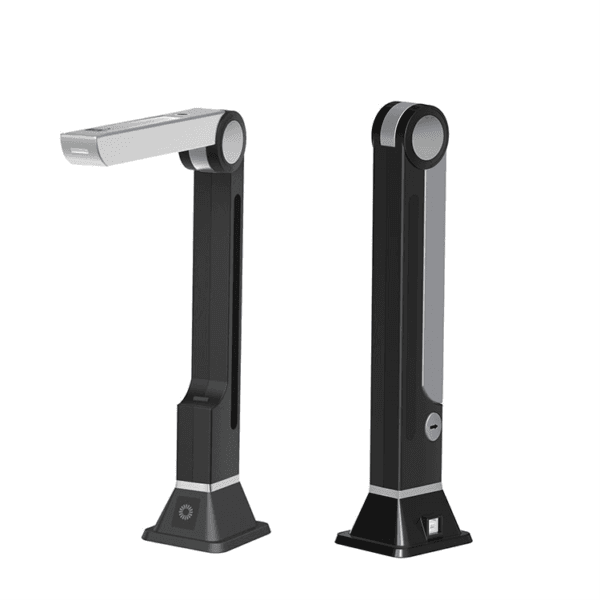
The PeopleLink iVision Document Camera is a Document Camera for Classrooms, Training Rooms and Presentations.

  • 5 MP Capture resolution
  • <1s Scan time
  • USB powered Connection
iVision Document Cameras
1 / 3
  • One OEM

    Hardware and Software from a single vendor

  • Deployed Globally

    Enterprise, Government, Education and Healthcare

  • Regional Partner Support

    Service and Support through PeopleLink Partners and Resellers in your region

  • Published Specifications

    PDF Datasheets available for PeopleLink products

Overview

What a USB Document Camera does in a Classroom or Training Room

The PeopleLink iVision Document Camera is a Document Camera for Classrooms, Training Rooms and Presentations. It captures at 5 Megapixels with a scan in under a second, and a built-in microphone records video with sound. OCR Recognition turns a captured page into searchable text, and Mirror, Rotate, Black and White and Positive or Negative views work on screen without changing the original. It runs on USB power, so a Classroom or a reception counter needs no extra adapter, and it sits alongside PeopleLink Room Solutions. A lightweight foldable body stores away between sessions, which suits a room that is not dedicated to recording.

Extraordinary Digital Presentation from the PeopleLink iVision, with true images in virtually any condition. A large, highly efficient Imaging Sensor and strong Document Capture deliver high quality images. Mirror, Rotate, Black and White and Positive or Negative views let you work with objects on screen without affecting the original source. The iVision is light and portable, with a foldable design that stores easily when it is not in use.
  • Built-in Microphone, could record video with sound
  • Capture high-quality at 5 mega pixel
  • Fastest scan, <1s
  • One click auto flip
  • Support OCR recognition
  • USB power, eco-friendly

Key Specifications

Headline specifications from the product Datasheet. Full model-by-model detail is in the PDF.

ItemiVision Document Cameras
Capture resolution5 MP
Scan time<1s
ConnectionUSB powered

Technical Specifications

Specifications
Capture Resolution5 megapixel
Scan SpeedFastest scan, <1s
MicrophoneBuilt-in microphone, records video with sound
Image ToolsMirror, rotate, black and white, positive/negative
Auto FlipOne click auto flip
OCRSupports OCR recognition
PowerUSB power, eco-friendly
DesignLightweight, portable, foldable

Rooms It Serves

Classrooms

Show Documents and Objects on screen for the whole class at 5 Megapixels.

Training rooms

Record video with sound using the Built-in Microphone.

Presentations

A portable foldable design with USB Power for easy setup anywhere.

Where a Document Camera Fits in Your Organisation

How organisations deploy a Document Camera, and what changes for the teams that use it

Education

Tutorial Rooms for a Coaching Institute

A private tutoring group keeps an iVision Document Camera in each Tutorial Room so a tutor can put a worked solution straight on the display. 5 Megapixel capture holds handwriting legible when the sheet fills the screen, and One Click Auto Flip corrects a page set down the wrong way round. The built-in microphone records the tutor's commentary along with the video. USB power means the camera shares the cable run already going to the room PC, and it folds into a drawer between sessions.

Healthcare

Referral Paperwork at a Clinic Group

A clinic group in North America captures referral letters and consent forms at reception instead of queuing for the office scanner. The iVision Document Camera takes a page in under a second, and OCR Recognition turns that capture into searchable text for the records system. Mirror, rotate and black and white tools tidy a page before it is filed, without altering the original document. USB power keeps a busy counter clear of another adapter.

Retail

Supplier Documents at a Retail Head Office

A retail head office reviews supplier documents on calls with buyers in other cities. An iVision Document Camera on the meeting table puts an invoice or a spec sheet on screen the moment it is needed, so nothing waits to be scanned and emailed first. Positive and negative viewing helps with a faint carbon copy, and the lightweight foldable body moves between meeting rooms as easily as a laptop.

Not sure which model fits your Classrooms or Training rooms?

Tell us the room size and seating. A PeopleLink specialist will recommend the right model.

Talk to Sales

How It Compares

CapabilityiVision Document CamerasTypical Alternative
Capture resolution5 megapixelLower resolution typical
Scan speedUnder 1 secondSlower typical
OCRSupportedNone
AudioBuilt-in microphoneNone
PowerUSB poweredMains adapter required

Why PeopleLink

Hardware and Software

Cameras, Audio, Control and Collaboration Platforms, built by one OEM.

Integrates Cleanly

PeopleLink Cameras pair with PeopleLink Audio, Control and Room Solutions out of the box.

Deployed Globally

Used across Enterprise, Government, Education and Healthcare environments.

Specialist Support

Talk to PeopleLink AV Specialists for sizing, integration and rollout.

Planning a multi-room or campus rollout?

Get one consolidated quote covering Hardware, Software and Installation from One OEM.

Request a Quote

Frequently Asked Questions

In the Room

Classrooms and Lecture Rooms, Photographed on Site

Teaching spaces where PeopleLink displays and podiums are installed.

Teacher standing between a blackboard and a PeopleLink interactive display in a school classroom
School ClassroomInteractive Display beside Blackboard
Classroom with interactive display, whiteboard and lectern
ClassroomInteractive Display and Lectern
Lecturer teaching from a PeopleLink digital podium with a student in the foreground
Lecture in ProgressDigital Podium

Talk to a PeopleLink Education Specialist about Document Cameras

Room, display and platform in one message. We reply with the right Visualizer.

Request Demo

Loading reCAPTCHA...

WhatsApp Updates

Get PeopleLink AV and Collaboration Updates on WhatsApp

Product Launches, Datasheets, Solution Guides for Meeting Rooms and Classrooms, Event Invitations and Partner Programme news from PeopleLink, a global AV and Unified Communications OEM. For CIOs, IT Heads, AV Consultants, System Integrators and Channel Partners.

  • Video Conferencing Cameras
  • Interactive Flat Panels
  • LED Video Walls
  • Digital Podiums
  • Audio Conferencing
  • Smart Classroom Solutions
  • Partner Programme
  1. 1. Scan or openScan the QR Code with your phone camera, or open visit.peoplelinkvc.com.
  2. 2. Fill the short formTick "Stay in Touch" and PeopleLink updates reach you on WhatsApp.

By ticking "Stay in Touch" on the form you agree to receive WhatsApp and email messages from PeopleLink Unified Communications about Products, Solutions, Events and Partner updates. You can opt out at any time.

Scan to join PeopleLink WhatsApp Updates

visit.peoplelinkvc.com