
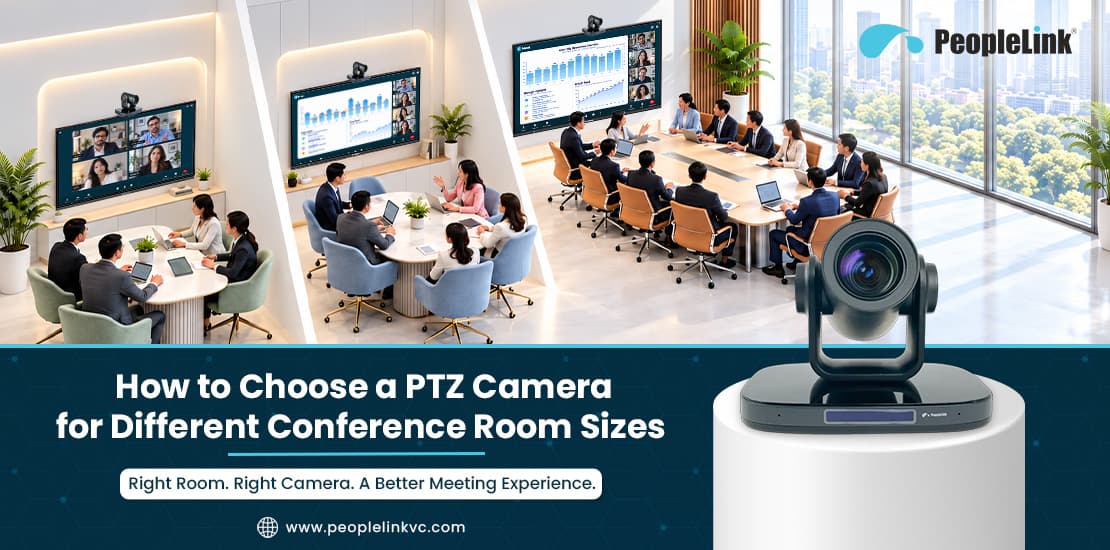
IT professionals and AV integrators understand the challenges of mismatched meeting room hardware. You’ve got remote participants looking at tiny faces 10 feet down the table, you’ve got people trying to see the screen from the side with a webcam that’s mounted in the most awkward position possible, and you’ve got video feeds that become difficult to see when direct sunlight enters through boardroom windows. When remote participants cannot clearly see people’s faces or identify who is speaking, they can quickly become disengaged.
Selecting the right PTZ camera for conference rooms is the key to closing the gap between face-to-face collaboration and remote presence. A PTZ (Pan, Tilt and Zoom) camera is a camera with mechanical movement and a special optical lens which enables the operator (or intelligent software) to pan left and right, tilt up and down, and zoom in on the speaker of interest, all without loss of image quality.
The right device is one that is matched to the physical architecture of the room. A camera that is superb in the boardroom will be a complete disaster in a huddle space. The other way around is equally bad; a very basic wide-angle camera will just leave the people at the back of the room as a series of blurred shapes. This guide looks at how to assess the size of the room, the level of optical zoom required, where to mount the camera, and the use of AI automation to deliver the optimum camera solution across your enterprise estate.
Why Conference Room Size Matters When Choosing a PTZ Camera
A fairly common procurement mistake is to buy a conference room camera on the basis of resolution alone. A 4K spec sheet will look very impressive but resolution in itself doesn’t make up for the wrong focal length, the narrow field of view, or lack of optical reach.Room dimensions dictate the optical geometry of every video call:
-
Field of View (FOV): A small meeting room will require a wide horizontal FOV (typically 90 degrees or wider) so that those sitting right up to the screen and camera are still in frame. A very wide lens in a long boardroom will of course give you a fisheye effect, which will make the people at the back of the room appear to be a lot further away.
-
Throw distance and optical zoom: As the depth of the room increases, digital zoom will start to degrade the image quality by pixelating the image. To record a sharp image of a person’s face at the far end of a 26-foot table, you’re going to need to physically adjust the lens via true optical zoom.
-
Viewing Geometry: The depth of the table and the height of the ceiling will determine whether the camera movement captures a natural eye-level conversation or whether you end up with the rather unflattering angles of a high ceiling or a very low credenza.
-
Display proportions: The bigger the room, the further people sit from the main display. Camera framing has to work in concert with the in-room monitor sizes to ensure the hybrid conversation feels physically proportionate.
Evaluating hardware through the prism of room architecture ensures your investment is one that supports your team’s actual working patterns.
How to Choose a PTZ Camera for Different Conference Room Sizes
Enterprise real estate is so varied that camera selection should be based on room size, seating configuration, and the anticipated interaction models. Participant numbers are a useful rule of thumb but the actual room length, depth, and seating distance will ultimately determine the technical specification.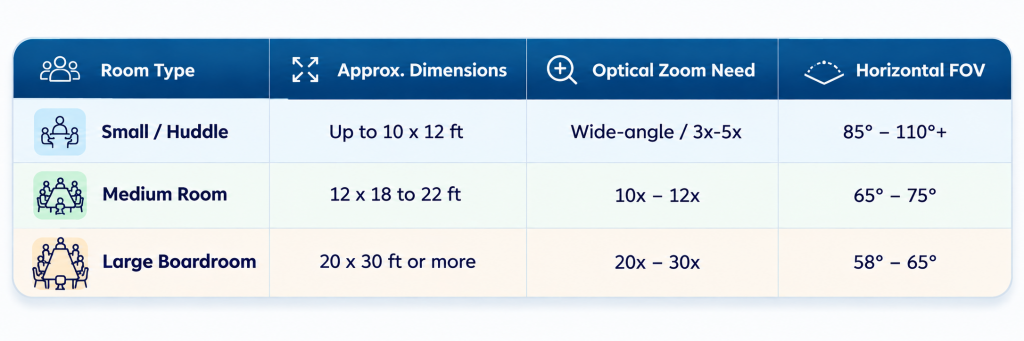
Small Meeting Rooms and Huddle Spaces
Medium-Sized Conference Rooms
Large Conference Rooms and Boardrooms
Key PTZ Camera Specifications to Evaluate Before Buying
Interpreting technical spec sheets can be a bit of a head-scratcher. Your focus should be on the hardware elements that actually deal with the problems you face in a meeting.1. Resolution: Full HD (1080p) vs. 4K Ultra HD
Video conferencing services such as Microsoft Teams and Zoom will often transmit video at 720p or 1080p as a way of conserving corporate bandwidth. A 4K PTZ camera, however, offers significant engineering benefits. The 4K physical image sensor has four times the raw pixel information of a 1080p sensor, and this translates into better colour fidelity, better contrast, and more digital cropping headroom when you’re combining optical and intelligent digital framing. Full HD cameras are still very much the reliable, cost-effective workhorse for the standard utility meeting room.
2. Optical Zoom vs. Digital Zoom
-
Optical Zoom: The physical glass elements within the lens move in and out to change the focal length. The image is magnified prior to it hitting the sensor and so 100% of the native image resolution is preserved.
-
Digital Zoom: The camera software crops in to the centre of the existing image and then blows up the pixels to simulate a closer view. This immediately introduces noise, artefacts, and blur.
For rooms over 15 feet in length, go for an optical zoom PTZ rather than software-based digital zoom.
3. Pan, Tilt, and Zoom Mechanics
Smooth, quiet mechanical motors are a must. You need a pan range of at least ±170 degrees and a tilt range of -30 to +90 degrees. The movement has to be smooth, otherwise you’re going to get those really jarring, distracting video cuts when you’re going through your room presets on an exec call.
4. Video Interfaces and Infrastructure Connectivity
Match the camera outputs to your room’s underlying AV infrastructure:
-
USB 3.0 Type-B / Type-C: Universal plug-and-play connectivity for room compute systems (Zoom Rooms, Teams Rooms, BYOD laptops).
-
HDMI: Direct low-latency feeds into display matrices, hardware codecs, or video capture cards.
-
IP/Ethernet (PoE): Video streaming, camera control (VISCA over IP, ONVIF), and electrical power all delivered via a single Cat6 cable. Very much a clean wall/ceiling installation indeed.
-
3G-SDI: The preferred option in large auditoriums, town halls, and broadcast-grade production control rooms for reliable cable runs over 100m.
5. Low-Light Processing and Wide Dynamic Range (WDR)
Corporate conference rooms are often subject to harsh direct sunlight, glass interior walls, or poor presentation lighting. High-quality 2D and 3D DNR together with hardware WDR will prevent the participants from being rendered as black silhouettes due to backlighting.
6. Hardware Presets and Control Flexibility
Make sure the camera has at least 10 to 64 hardware presets that can be readily recalled via an IR remote, RS-232/RS-485 serial controllers, or via networked touch panels on the table.
How to Determine the Right Optical Zoom for Your Conference Room
To pick the right optical zoom, measure the distance from the camera lens to the furthest seat in the room.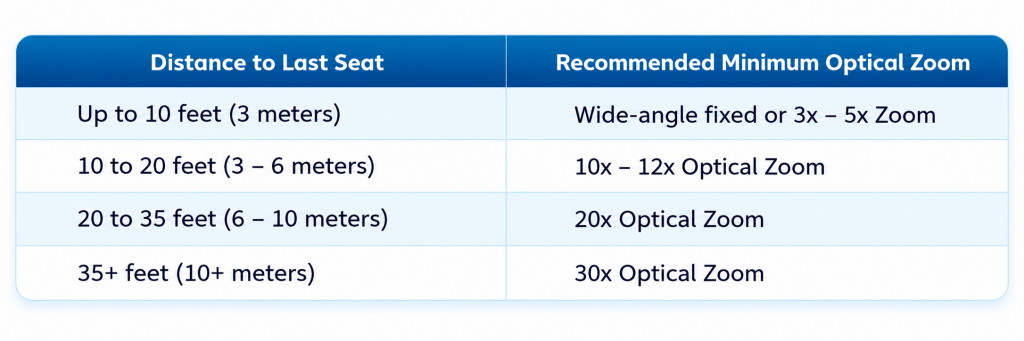 Keep in mind that higher optical zoom is not necessarily better. A lens with 30x optical zoom will typically have a much narrower wide angle at its widest focal length. If you have a 30x lens in an 11-foot room, the camera is likely to crop out the people sitting closest to the display wall and the meeting will be very awkward to run. Always match the lens focal range to your room’s distance profile.
Conference Room Camera Placement: Best Practices
Even the highest-end conference room camera will perform poorly if positioned poorly. Use these field-tested guidelines during installation:-
Maintain eye-level alignment. Install the camera as close to seated eye level as is physically possible (typically 40 to 48 inches above finished floor). If you’re installing it high up on a 10-foot ceiling, you’re going to get a very unflattering view where people are looking down at the table rather than into the eyes of their remote peers.
-
Place the camera close to the main display (directly below the monitor if that’s where it’s mounted, or directly above if the display is low). When the in-room participants are looking at the screen to view shared charts or to see their colleagues, their line of sight will be right at the camera lens. That’s the key to creating the illusion of eye contact.
-
Manage backlighting and glare by avoiding the situation where you’re pointing the camera straight at an unshaded exterior window. If you have a meeting room with a glass perimeter, arrange the room layout so that the camera is pointing away from the light source or fit motorised blinds to the windows to achieve a balanced level of background illumination.
-
Plan your cable runs as early as possible. Standard USB 3.0 cables will degrade the quality of your data beyond 10 to 15 feet without the use of active extension chips. If you’re running long distances across a boardroom, you’re going to want to look at cameras that support PoE and IP streaming, or use dedicated USB-over-Cat6 extenders.
-
Test views with a full room: Prior to bolting down the wall anchors, have an interactive test call. Get people in every chair, check that the widest angle does indeed catch the near corners, and that the high zooms will frame the far end without picking up the wall switchboards or the ceiling fixtures that would be distracting.
PTZ Camera vs. AI Tracking Camera: Which Is Right for Your Meeting Room?
The rise of AI in AV hardware has changed the way enterprise spaces operate. Knowing how a traditional mechanical PTZ compares to an AI-assisted model will go a long way to helping you decide which is the right one for your team’s working style.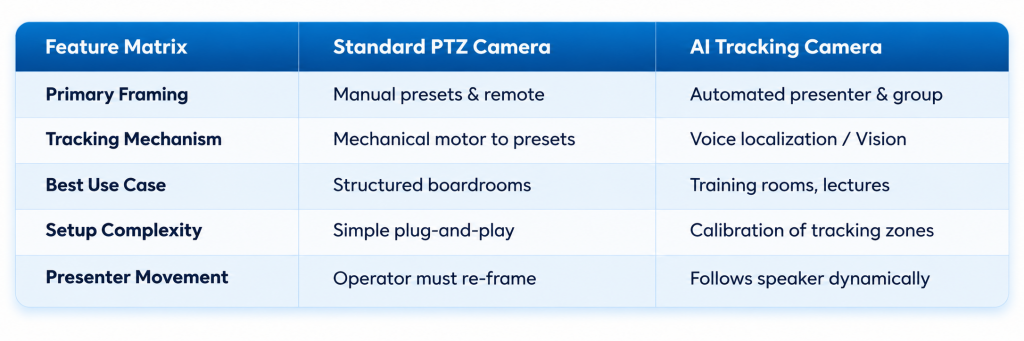 Modern enterprise video conferencing solutions are increasingly hybrid. You’ll find hybrid cameras which have the motorised pan-tilt-zoom hardware plus a dedicated secondary reference sensor running deep learning algorithms. In that hybrid configuration, the camera can automatically frame the whole room, switch to the active speaker when they get up to write on the whiteboard, and then quietly go back to group framing when the presentation is over.
If you’ve got meetings that are essentially organised discussions with people sitting around a table, then a good quality PTZ camera with programmable presets is usually the most cost-effective solution. If, on the other hand, you have rooms that are used for lectures, client presentations, or training sessions where the speaker is going to be walking around the room quite a bit, then an AI tracking camera for conference rooms is absolutely worth the money.
Common Mistakes to Avoid When Selecting a Conference Room Camera
-
Shopping by megapixel rating alone (i.e. prioritising 4K resolution over optical lens quality and mechanical zoom) leaves you with very pixelated images in long conference rooms when you’re trying to frame a speaker some distance away.
-
Neglecting the wide-angle requirements in a shallow room. If you install a telephoto PTZ in a short, wide room, you effectively cut off the edge seats and you’re left with colleagues all squeezed in the middle of the frame.
-
Mounting above 7 feet without any angle adjustment: if you mount the camera high on the wall with no downward tilt, then your video feed will be dominated by the top of people’s heads and the top of the conference table.
-
Forgetting about room audio and platform integration. A camera is just one element of the collaboration chain. You need to ensure that your video feed integrates seamlessly with your ceiling mics, your DSPs, and your video platforms (Zoom, Teams, Webex, etc.).
-
Skipping real-world lighting tests. Test the room under just bright indoor lights and you’re going to miss how the sensor behaves in the dim light of a morning or the bright glare of afternoon light. Always test in mixed ambient light.
Choosing the Right PTZ Camera for Your Business
Selecting the right PTZ camera for hybrid meetings is all about matching the room dimensions, the number of seats, the camera mounting geometry, and the user workflows.
When planning your company’s meeting room upgrades:
-
Measure your shortest and longest viewing distances.
-
Assess whether your teams require simple manual presets or active presenter tracking.
-
Confirm your required connectivity standards (USB, HDMI, IP/PoE).
For businesses looking at the kind of reliable, enterprise-grade video collaboration hardware, PeopleLink Unified Communications Pvt. Ltd. have a very wide range of conference room systems. Their range of professional PTZ cameras is designed for every type of commercial space, from the wide-angle USB camera for huddle rooms through to the high-performance 10x and 12x optical zoom cameras for the mid-sized meeting room, and then the more sophisticated 4K 20x/30x PTZ units for the large executive boardrooms and training halls.
With intelligent voice and vision auto-tracking, versatile IP/PoE connectivity, and broad platform support with modern UC platforms, the PeopleLink range of products enables enterprise IT teams to deliver truly natural, lifelike meeting experiences in every room in their portfolio.
Ready to Optimise Your Hybrid Meeting Rooms?
Get in touch with PeopleLink to arrange an enterprise consultation or book a live product demo for natural hybrid collaboration.
Book a Free AV Consultation →
Conclusion
Upgrading your enterprise video experience is about more than just matching pixel counts or selecting the highest zoom lens off the shelf. The right PTZ camera for your conference room is one that’s been selected with the camera’s optical field of view, focal length, zoom capability, and mounting position all in line with the actual physical layout of your meeting room.
By measuring room throw, working out camera sightlines, and determining whether your teams actually benefit more from standard preset framing or from dynamic AI tracking, you can go on to build hybrid collaboration spaces that just feel right, are professional, and are simply effortless to use.
Work with PeopleLink Unified Communications to evaluate your room portfolio, select the appropriate camera optics, and deploy unified enterprise video collaboration systems designed for the modern workplace.