AV Control Systems · Wireless Presenter

Wireless PresenterUSB-C and USB-A Wireless Presenter with 4K Output for Meeting Rooms and Classrooms

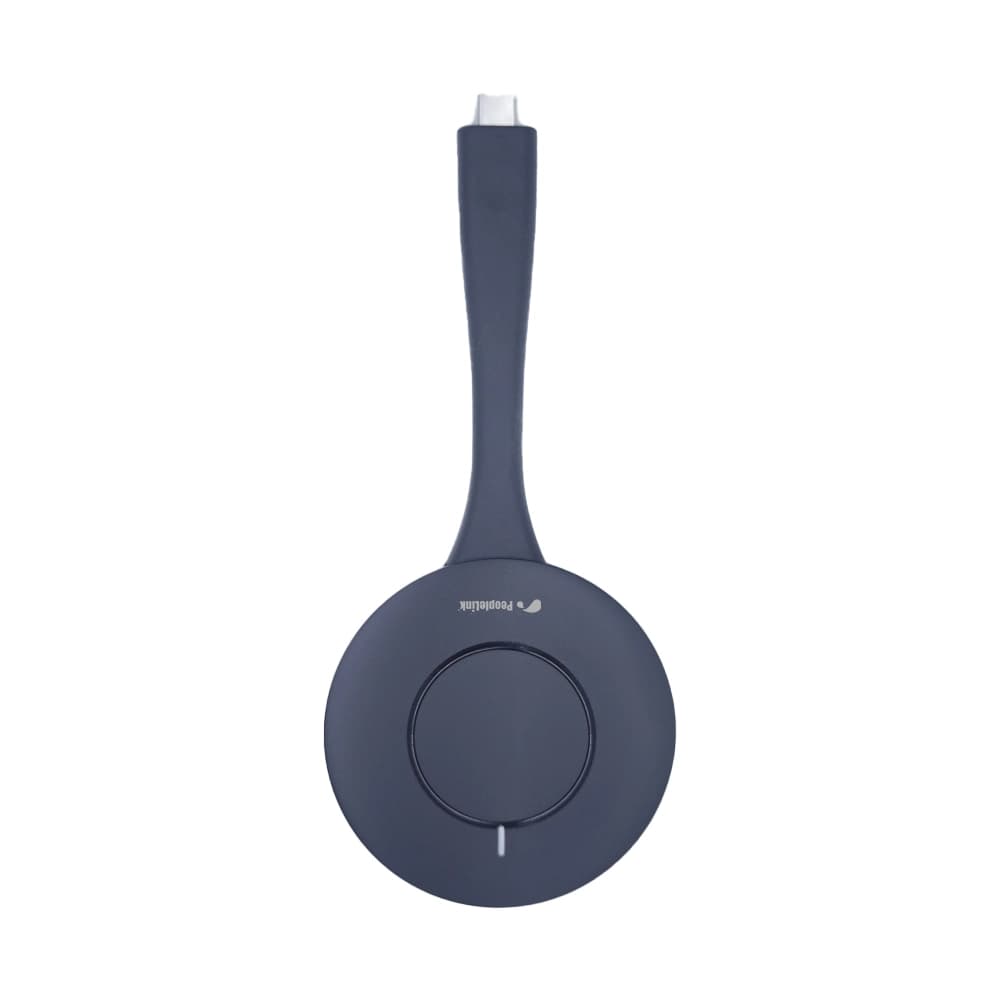
The PeopleLink Wireless Presenter is a Wireless Presenter for Meeting Rooms, Classrooms and Presentation Spaces.

  • USB-C / USB-A 2-in-1 Interface
  • 4K at 30Hz Output
  • Up to 30m Range
Wireless Presenter - Top-View
1 / 6
  • One OEM

    Hardware and Software from a single vendor

  • Deployed Globally

    Enterprise, Government, Education and Healthcare

  • Regional Partner Support

    Service and Support through PeopleLink Partners and Resellers in your region

  • Published Specifications

    PDF Datasheets available for PeopleLink products

Overview

What a Wireless Presenter does in a Presentation Space

The PeopleLink Wireless Presenter is a Wireless Presenter for Meeting Rooms, Classrooms and Presentation Spaces. The USB-C and USB-A 2-in-1 transmitter projects at 1080P or 4K at 30Hz over 5.8G Wi-Fi, up to 30m without obstructions, with AES encryption. Up to 8 devices connect at once, 10-Point Touch Control sends touch back from the room screen, and a built-in Virtual Camera and Microphone let a laptop join a call through the room equipment. It works with Windows, Mac and Linux and pairs with a PeopleLink Display. At 51g there is nothing to install and nothing heavy to carry between rooms.

PeopleLink Wireless presenter is a USB-C/USB-A 2-in-1 transmitter supporting 4K 30Hz wireless projection. It enables DP mode projection for USB-C devices, including computers, mobile phones and tablets, as well as USB-A mode projection for computers. A USB-A adapter can be added to support Windows and Mac devices.
  • 2-in-1 Interface: USB-C & USB-A support for wide device compatibility
  • Wireless 4K Projection: Supports 1080p & 4K@30Hz
  • Multi-User Connectivity: Up to 8 devices (external Wi-Fi AP required beyond 8)
  • Long Transmission Range: Up to 30 meters
  • High Frame Rate Support: 1080p @ 30-60Hz
  • 10-Point Touch Control: For interactive presentations
  • Dual Mode Projection: DP Mode (USB-C) & USB-A Mode
  • Built-in Virtual Camera & Microphone: 1080p MJPEG camera & PCM 16-bit audio
  • Ultra-Lightweight Design: Only 51g with LED indicator
  • 5.8GHz Wi-Fi: For stable wireless performance

Key Specifications

Headline specifications from the product Datasheet. Full model-by-model detail is in the PDF.

ItemWireless Presenter
InterfaceUSB-C / USB-A 2-in-1
Output4K at 30Hz
RangeUp to 30m

Technical Specifications

Hardware
InterfaceUSB-A / USB-C (USB-C port functions as a standard A port)
Number of ConnectionsMaximum 8 connections; an external Wi-Fi AP is required for more than 8
Power ConsumptionDC 5V, maximum 2.5W
Weight51g
Dimensions (Product)158mm x 70mm x 13mm (+2mm)
Dimensions (Packaging)208mm x 108mm x 32mm (plus or minus 2mm)
Indicator LightWhite
System
Transmission Delay90 to 180ms
Output Resolution1080P, 4K
Frame Rate30 to 60Hz; 4K at 30Hz
Operating SystemWindows 7/8/10/11, Apple Mac, Linux
Display ModeSupports extended desktop (Windows 7/8/10/11, Mac)
Touch Control10-point touch (Windows 7/8/10/11, Mac); mouse mode return (Windows, Mac)
Virtual Camera1080P30, MJPEG
Virtual MicrophonePCM 16bits
Wireless
Transmission ProtocolIEEE 802.11 a/g/n/ac
Wi-Fi5.8G
EncryptionAES
Authentication ProtocolWPA2-PSK
Transmission DistanceUp to 30m (without obstructions)

Rooms It Serves

Meeting rooms

Wireless 4K Sharing from laptops, phones and tablets to the room display, for up to 8 devices.

Classrooms

10-Point Touch Control and Dual Mode Projection for Interactive Teaching.

Presentation spaces

Virtual Camera and Microphone passthrough so a guest laptop uses the room equipment.

Where a Wireless Presenter Fits in Your Organisation

How organisations deploy a Wireless Presenter, and what changes for the teams that use it

Enterprise

Meeting Room Sharing for a Professional Services Firm

A professional services firm keeps a PeopleLink Wireless Presenter in every Meeting Room, so a visitor shares from their own laptop with no cable and nothing to install. The 2-in-1 USB-C and USB-A transmitter suits whichever machine walks in, and projection runs at 1080p or 4K at 30Hz on the room display. Up to 8 devices connect at once, so a working session moves between people. AES encryption with WPA2-PSK keeps client material off the open network.

Education

Training Room Sharing for a Polytechnic

A polytechnic fits its Training Rooms with the PeopleLink Wireless Presenter. An instructor shares from a laptop or tablet up to 30 metres from the display, and 10-Point Touch Control sends touch back from the room screen, so annotation happens where the class is already looking. A transmission delay of 90 to 180ms keeps a live demonstration in step with the commentary. At 51g the transmitter is easy to pass around the room.

Government

Briefing Room Sharing for a Public Works Department

A public works department uses the PeopleLink Wireless Presenter in its Briefing Rooms. Officers arrive with different machines, and the transmitter covers Windows, Mac and Linux with no software to install first. Extended desktop mode lets a presenter keep notes on the laptop while drawings go to the room display. The built-in Virtual Camera and Microphone let that same laptop join a call through the room's equipment.

Not sure which model fits your Meeting rooms or Classrooms?

Tell us the room size and seating. A PeopleLink specialist will recommend the right model.

Talk to Sales

How It Compares

CapabilityWireless PresenterTypical Alternative
InterfaceUSB-C and USB-A 2-in-1Single connector only
Output4K at 30Hz with touch control1080P, no touch
PassthroughVirtual camera and microphoneScreen mirror only
Wireless5.8G with AES encryption, up to 30mWired connection

Why PeopleLink

Hardware plus Software

Cameras, Audio, Control and Collaboration Platforms, built by one OEM.

Integrates Cleanly

PeopleLink Accessories pair with PeopleLink Cameras, Audio and Room Solutions out of the box, and the Virtual Camera and Microphone put the room's own devices on a guest laptop.

Deployed Globally

Used across Enterprise, Government, Education and Healthcare environments.

Specialist Support

Talk to PeopleLink AV Specialists for sizing, integration and rollout.

Planning a multi-room or campus rollout?

Get one consolidated quote covering Hardware, Software and Installation from One OEM.

Request a Quote

Frequently Asked Questions

In the Room

Presentation Rooms, Photographed on Site

Meeting rooms and lecture rooms fitted with PeopleLink displays.

Person using a PeopleLink interactive display in a meeting room with a wall mural
Interactive Display in UseMeeting Room
Large PeopleLink interactive display in a boardroom
Large-Format Interactive DisplayBoardroom
Lecturer teaching from a PeopleLink digital podium with a student in the foreground
Lecture in ProgressDigital Podium

Talk to a PeopleLink Room Specialist about Wireless Presenters

Room size, displays and platform in one message. We reply with the right Room System and accessories.

Request Demo

Loading reCAPTCHA...

WhatsApp Updates

Get PeopleLink AV and Collaboration Updates on WhatsApp

Product Launches, Datasheets, Solution Guides for Meeting Rooms and Classrooms, Event Invitations and Partner Programme news from PeopleLink, a global AV and Unified Communications OEM. For CIOs, IT Heads, AV Consultants, System Integrators and Channel Partners.

  • Video Conferencing Cameras
  • Interactive Flat Panels
  • LED Video Walls
  • Digital Podiums
  • Audio Conferencing
  • Smart Classroom Solutions
  • Partner Programme
  1. 1. Scan or openScan the QR Code with your phone camera, or open visit.peoplelinkvc.com.
  2. 2. Fill the short formTick "Stay in Touch" and PeopleLink updates reach you on WhatsApp.

By ticking "Stay in Touch" on the form you agree to receive WhatsApp and email messages from PeopleLink Unified Communications about Products, Solutions, Events and Partner updates. You can opt out at any time.

Scan to join PeopleLink WhatsApp Updates

visit.peoplelinkvc.com