Android Endpoints · Touch Panel Endpoint

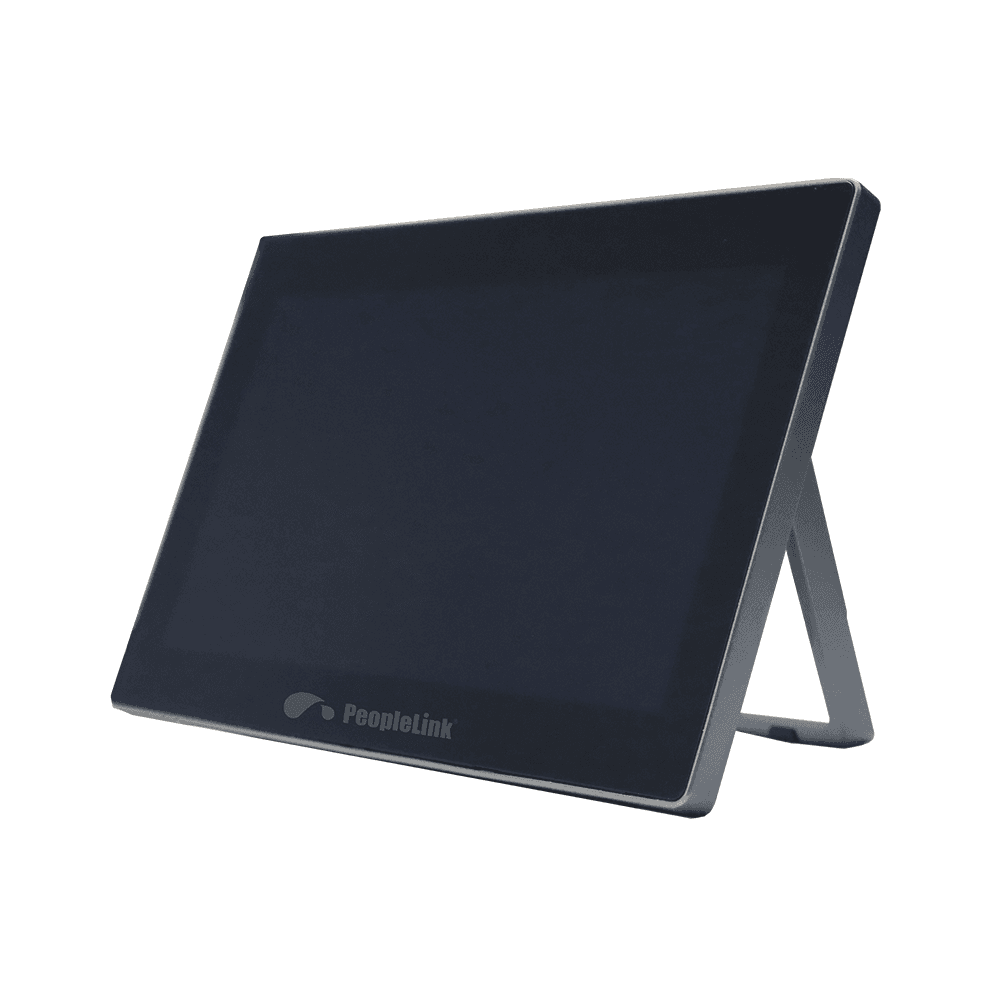
PeopleLink Interact W10T10 inch Touch Panel Video Conferencing Endpoint with PoE for Meeting Rooms and Boardrooms

The PeopleLink Interact W10T is a Touch Panel Endpoint built around Video Conferencing for Meeting Rooms and Boardrooms.

  • 10" capacitive, 1080p@60Hz Screen
  • PoE from box Power
  • Android 8.1 Operating system
PeopleLink Interact W10T
  • One OEM

    Hardware and Software from a single vendor

  • Deployed Globally

    Enterprise, Government, Education and Healthcare

  • Regional Partner Support

    Service and Support through PeopleLink Partners and Resellers in your region

  • Published Specifications

    PDF Datasheets available for PeopleLink products

Overview

What a Touch Panel Endpoint does for Meeting Control

The PeopleLink Interact W10T is a Touch Panel Endpoint built around Video Conferencing for Meeting Rooms and Boardrooms. The 10 inch Capacitive Touch Screen runs at 1080p and 60Hz on Android 8.1, and the panel powers from the box over PoE, so one cable carries both signal and power. HDMI IN at 1080p and 60Hz, two USB 2.0 ports and a USB Type-C port with DP in cover the room's sources and peripherals. It is light and works at several angles, with responsive writing that mirrors annotation and One-Click Control for meeting management. On the table it becomes the control surface for PeopleLink Cameras and Audio in the room.

The Interact W10T touch Panel is developed around video conferencing. It has multiple types of USB ports, Power over Ethernet, and supports HDMI IN, and HUB where a single cable carries both signals and power for the device. It is light and handheld-friendly to the user, achieving annotation just right on your hand. With multi-angle available, you can achieve flexible gestures during the conference. Responsive writing for mirroring annotations. One-click control for meeting management.
  • Power: From Box (PoE)
  • Screen: 10" Capacitive Touch Screen (1080p@60Hz)
  • HDMI IN: 1 (1080p@60Hz)
  • LAN with PoE: 1 (RJ45)
  • USB: 2 (USB 2.0)
  • USB Type C: 1 (DP in + USB 2.0)
  • Power button: 1

Key Specifications

Headline specifications from the product Datasheet. Full model-by-model detail is in the PDF.

ItemPeopleLink Interact W10T
Screen10" capacitive, 1080p@60Hz
PowerPoE from box
Operating systemAndroid 8.1

Technical Specifications

Specifications
PowerFrom Box (PoE)
Screen10" Capacitive Touch Screen (1080p@60Hz)
HDMI IN1 (1080p@60Hz)
LAN with PoE1 (RJ45)
USB2 (USB 2.0)
USB Type C1 (DP in + USB 2.0)
Power button1

Rooms It Serves

Meeting control

One-Click Control panel for managing the meeting from a 10 inch Touch Screen.

Annotation

Responsive writing mirrors annotations to the room display during a conference.

Single-cable install

Power over Ethernet carries both signal and power over one RJ45 cable.

Where an Android Video Conferencing Endpoint Fits in Your Organisation

How organisations deploy an Android Video Conferencing Endpoint, and what changes for the teams that use it

Manufacturing

Boardroom Control Panel for a Manufacturing Group

A manufacturing group sets the PeopleLink Interact W10T into the table in its Boardroom so a meeting starts with one touch. The 10 inch Capacitive Touch Screen runs at 1080p and 60Hz, and One-Click Control opens the session without a laptop taking over the table. A single PoE cable carries power and signal, so the installer runs one line to the table box. HDMI IN takes a laptop feed, and the panel sits alongside PeopleLink Cameras and Audio in the same room.

Public Sector

Courtroom Control Panel for a District Court

A district court fits each Courtroom with the PeopleLink Interact W10T as the control surface for remote hearings. Staff manage the session from the panel rather than a keyboard, and on-screen annotation marks up an exhibit brought in over HDMI IN. Power over Ethernet leaves one tidy cable at the clerk's position, while two USB 2.0 ports and USB Type-C take peripherals. The built-in speaker and microphone confirm audio before proceedings begin.

Education

Campus Meeting Room Panel for a University

A university standardises its Campus Meeting Rooms on the PeopleLink Interact W10T so every room is operated the same way. The panel is light and sits at several angles, so a presenter can hold it or leave it flat while writing. Responsive writing mirrors annotation to the room display for colleagues joining remotely. Because the panel draws power over the LAN cable, the estates team fits rooms without adding power outlets.

Not sure which model fits your Meeting control or Annotation?

Tell us the room size and seating. A PeopleLink specialist will recommend the right model.

Talk to Sales

How It Compares

CapabilityPeopleLink Interact W10TTypical Alternative
Display10" 1080p capacitive touchA consumer meeting app
CablingSingle PoE cable for power and signalSeparate power and data
InputsHDMI IN plus dual USBUSB only typical
IntegrationPairs with PeopleLink room solutionsSingle device only

Why PeopleLink

Hardware plus Software

Cameras, Audio, Control and Collaboration Platforms, built by one OEM.

Integrates Cleanly

PeopleLink Endpoints pair with PeopleLink Cameras, Audio and Room Solutions out of the box, and a single PoE cable carries both power and signal to the table.

Deployed Globally

Used across Enterprise, Government, Education and Healthcare environments.

Specialist Support

Talk to PeopleLink AV Specialists for sizing, integration and rollout.

Planning a multi-room or campus rollout?

Get one consolidated quote covering Hardware, Software and Installation from One OEM.

Request a Quote

Frequently Asked Questions

In the Room

Small Rooms, Photographed on Site

Huddle rooms and meeting tables fitted by PeopleLink.

Huddle room with a PeopleLink display, camera and speakerphone
Huddle RoomDisplay, Camera and Speakerphone
Meeting table with speakerphone, PTZ camera and interactive display
Meeting RoomDisplay with PTZ Camera and Speakerphone
Meeting table with speakerphone facing an interactive display and camera
Meeting Room StackSpeakerphone, Display and Camera

Talk to a PeopleLink Video Specialist about Android Endpoints

Room size, existing systems and network in one message. We reply with the right Endpoint and Camera.

Request Demo

Loading reCAPTCHA...

WhatsApp Updates

Get PeopleLink AV and Collaboration Updates on WhatsApp

Product Launches, Datasheets, Solution Guides for Meeting Rooms and Classrooms, Event Invitations and Partner Programme news from PeopleLink, a global AV and Unified Communications OEM. For CIOs, IT Heads, AV Consultants, System Integrators and Channel Partners.

  • Video Conferencing Cameras
  • Interactive Flat Panels
  • LED Video Walls
  • Digital Podiums
  • Audio Conferencing
  • Smart Classroom Solutions
  • Partner Programme
  1. 1. Scan or openScan the QR Code with your phone camera, or open visit.peoplelinkvc.com.
  2. 2. Fill the short formTick "Stay in Touch" and PeopleLink updates reach you on WhatsApp.

By ticking "Stay in Touch" on the form you agree to receive WhatsApp and email messages from PeopleLink Unified Communications about Products, Solutions, Events and Partner updates. You can opt out at any time.

Scan to join PeopleLink WhatsApp Updates

visit.peoplelinkvc.com